Login
Dhamma.gift doesn't need an account or an email address. "Login" here means cloud sync of your favorites, history, subscriptions, reading progress and settings across devices — three ways to do it:
- Google — a regular Google account sign-in.
- Apple — Sign in with Apple, with your Apple ID. Apple may let you hide your e-mail; we then only get a private relay address from Apple.
- Secret passphrase — fully anonymous: pick a phrase of at least 8 characters (no email, no password). Anyone who types the same phrase on another device gets access to the same synced data — treat it like a password.
If the device already has local data
Logging in (either way) on a device that already has its own history or favorites shows a choice:
- Merge — keep what's already on this device and add the cloud data on top of it.
- Overwrite — wipe this device's data and pull down the cloud copy instead.
After logging in
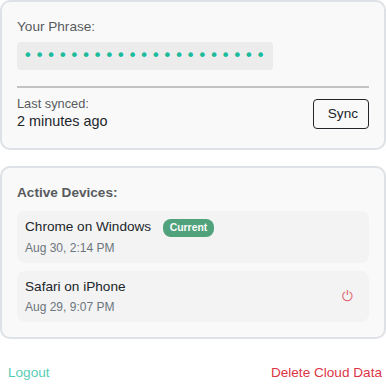
- Sync now — force a sync right away instead of waiting for the automatic one.
- Active devices — a list of every device currently signed in with this same phrase/account, with its device model and browser (detected automatically, nothing you type in) and last-active time.
Three different actions are easy to mix up — they don't touch the same data:
| Action | Where you click it | What it wipes |
|---|---|---|
| Sign out | On this device | Nothing — it just turns off sync on this device. Local and cloud data are both left alone. |
| Delete account & cloud data | On this device | Everything in the cloud (history, favorites, subscriptions, progress, settings, the account itself). Doesn't touch local data on this device. |
| Terminate session (the ⏻ icon next to another device in the list) | Remotely, from any device in the list | Disconnects THAT device from the cloud and wipes all of its local data (except language and theme) — the confirmation prompt warns you about this honestly. |
Clicking ⏻ on your OWN second device (say, your phone, thinking "I'll just close that extra session") wipes everything on that phone the next time it touches the network: history, favorites, reading progress, settings. Only use it on devices that are genuinely lost or shouldn't have access anymore.
How the secret passphrase is stored
The phrase is normalized (lowercased, spaces → hyphens) and hashed on your device (SHA-256) before anything is sent to the cloud — the hash, not the phrase itself, is what identifies your data in the cloud.